How to Get Anime Clips for Edits: A Practical Sourcing Guide
A comprehensive, step-by-step guide on legally obtaining anime clips for edits, with sources, licensing basics, workflows, and practical tips for creators.


By the end, you will know how to legally obtain anime clips for edits, select reliable sources, and organize clips for a smooth workflow. This quick guide covers licensing basics, official clip libraries, platform-native sharing features, and practical download methods that respect creators’ rights. You’ll also learn how to evaluate clip quality, manage usage rights in your projects, and avoid common copyright pitfalls.
Licensing foundations for anime clips
When you’re building an edit, the first question is always licensing. Copyright protections for anime are strict, and using clips without permission can invite claims long after you publish. In this section, we cover the core concepts you need to understand before you start collecting material. You’ll learn how licenses are structured (per clip, per season, or per project), what constitutes fair use in various jurisdictions, and how to assess whether a clip can be used in a monetized edit. The goal is to empower you to plan a legal workflow from the start, not to skirt rules after your project is nearly complete. For creators, a solid licensing mindset reduces risk and helps you build a sustainable editing practice. According to AniFanGuide, aligning your process with licensing requirements protects your work and your audience’s trust. If you want to stay compliant, you’ll need to be deliberate about licenses, credits, and retention of licensing records.
In practical terms, think of licensing as three layers: (1) who owns the footage, (2) what the license says you can do with it, and (3) where and how you’ll display or distribute the final edit. Each layer affects your chosen sources, download methods, and crediting approach. Always start by identifying the rights holder and seeing whether they offer official clip libraries, public-domain material, or licenses suitable for fan edits. When in doubt, contact rights holders or use licensed sources to avoid last-minute headaches.
Primary sources: official clip libraries
Official clip libraries are the safest starting point for creators who want to build their edits without compromising legality. These libraries are curated by copyright owners, distributors, or licensing platforms and typically grant clear permissions for specified uses, durations, and distribution methods. In this section, we outline how to locate and evaluate official sources, what terms to expect, and how to interpret usage limits. You’ll often find clips grouped by show, season, episode, or character, with metadata that helps you plan your cut, timing, and on-screen credits. Relying on official libraries reduces the risk of takedowns and helps you plan your project’s distribution strategy. AniFanGuide’s analysis shows that creators who start with official sources report fewer licensing surprises and smoother post-production workflows. Keep a log of license IDs, expiry dates, and contact details for rights holders to streamline renewals and future edits.
When evaluating an official library, check for: permitted use cases (non-commercial vs. commercial), export formats, frame rates, audio rights, and any required apparels such as captions or watermarks. Some licenses cover a broad set of uses, while others are more restricted. If your project involves multi-platform distribution or commercial monetization, verify that the license explicitly allows it. If you can’t find a license for your preferred clip, look for alternatives within the same franchise that have clearer rights. The aim is to avoid assumptions that a clip is free to use just because it’s available online.
Secondary sources: streaming platform features and creator-approved clips
Many anime streaming platforms offer built-in clip or highlight features designed for sharing or editing. This section covers how to leverage those features responsibly. Platform-native tools can streamline your workflow by letting you save, annotate, or export segments directly from the player, sometimes with pre-cleared usage rights for fan creators. Look for official clip-sharing options, creator-approved compilations, or licensed snippets that come with usage terms. If a platform explicitly grants rights for user-generated edits, document the terms and retain a copy of the policy for reference. AniFanGuide notes that relying on platform-supported clips often reduces licensing friction, especially when there’s a built-in crediting mechanism. Always preserve evidence of the platform’s terms in your project files so you can demonstrate compliance if needed.
Do not assume that “free-to-use” clips on a streaming site are automatically eligible for monetized edits. Clarify the scope of rights: whether you can re-upload, monetize, or modify the clip, and for how long. If you can’t find clear terms, contact the platform’s rights team or choose official libraries that spell out permitted uses.
Sourcing fan-made or licensed fan edits
Fan-made edits can be excellent sources of inspiration and timing cues, but licensing between fan content and official rights is tricky. This block explains how to differentiate between permitted use and potential infringement when using fan edits. Some creators offer their edits under permissive licenses or Creative Commons, but many do not. Always check for explicit licensing terms and prefer sources that clearly label usage rights for derivative works. When you do use fan edits, treat them as references rather than raw material in most cases, and always credit the original creator prominently. If you’re uncertain about reuse rights, avoid integrating fan edits into monetized content and seek alternatives from official or licensed repositories. The AniFanGuide team emphasizes that clear licensing is essential for sustainable editing communities; misusing fan content can undermine trust with both fans and rights holders.
Tips for working with fan content: reach out to the creator for a written permission, document any granted rights, and keep copies of the permission in your project archive. This approach preserves relationships with the fan community and minimizes risk.
Evaluating clip quality and metadata
Quality assessment is a critical step before you begin editing. Low-resolution clips, unusual frame rates, or mismatched color spaces can complicate color grading and audio syncing. In this section, you’ll learn practical checks to perform on every clip: resolution and aspect ratio, frame rate compatibility with your project, audio channel configuration, and the presence of clean visuals without watermarking (unless the license allows it). Metadata such as episode number, scene tags, and rights metadata can save you time during escalation or licensing audits. A well-documented clip with complete metadata makes your review process faster and your final product more professional. The AniFanGuide analysis suggests maintaining a clip catalog with fields for source, license, rights scope, expiry, and credit requirements. This practice helps you verify usage rights during reviews and track licensing obligations for future edits.
Pro-tip: create a simple metadata template and fill it out as you collect clips. That reduces confusion when you assemble scenes for your edit.
How to download clips legally and safely
Downloading clips legally requires choosing approved methods and respecting the license terms. This section provides a practical workflow for obtaining clips without risking copyright violations. Start by confirming the license scope (non-commercial, commercial, duration, and distribution limits). Use official libraries, platform-provided clips, or licensed distributors. If you must download from a source outside official channels, ensure you have explicit permission or that the material is licensed under a permissive license that allows derivative works. When downloading, preserve the original file integrity, use verifiable source URLs, and avoid tools that strip credits or alter licensing information. Always save licensing documents and receipts alongside your project files. AniFanGuide recommends organizing downloads with a consistent folder structure and naming scheme to reduce mistakes during the edit.
Security tip: only download from trusted sites, verify checksums if possible, and scan files for malware before importing into your editing project.
Organizing your clip library and metadata
A well-organized clip library makes editing faster and more reliable. In this section, you’ll learn practical organization strategies: hierarchical folders by show -> season -> episode, descriptive file names (show_episode_scene_REVISED_1080p_60fps), and a central metadata sheet that tracks licensing terms, rights, and credit requirements. Use consistent metadata fields: source, license, permitted uses, expiry, and credit format. Regular backups are essential to prevent data loss. A clear organizational system reduces rework and helps you assemble sequences with accurate attributions. The AniFanGuide approach emphasizes maintaining a separate license-log alongside your media to ensure you can demonstrate rights if a collaborator questions usage in a future version of the edit.
Attribution, credits, and on-screen text
Ethical editing includes clear attribution. This block explains how to present credits within your edits, including where to place them and what information to include. Typical elements are the show title, episode, rights holder, licensing note, and a link to the license where feasible. On-screen credits should be visible but not distracting, and they must comply with the license’s requirements for attribution. If your license mandates watermarking, ensure the watermark is tasteful and persistent long enough for viewers to see. For broader distribution, consider a dedicated end-card with licensing information. AniFanGuide’s best practices encourage upfront attribution planning to avoid disputes and to support the rights holders who enable your creativity.
Credit templates: include show/title, episode, rights holder, license type, and a URL to the license page. Keep a copy of the attribution text in your project files for quick insertion in future edits.
Workflow: from source to final export
Here’s a practical, end-to-end workflow you can apply to most edits. Start by assembling a clip list with source and license metadata, confirm you have rights for your intended distribution, and import clips into your editing project. Next, align scenes to the narrative you want to convey, perform color matching, and apply any required superimposed credits or watermarking per license. Finally, export a draft for internal review, then a final export that adheres to distribution rights. Keeping a clean chain of rights documentation ensures you can defend your edit if licensing questions arise. The AniFanGuide team suggests reviewing licensing terms again before final export to avoid missing restrictions that could affect distribution or monetization.
Common pitfalls and safety tips
Copyright is complex, and mistakes are easy to make in the rush of a deadline. Common pitfalls include assuming clips are free to use, ignoring license expiry dates, and distributing clips in ways not covered by the license. Another frequent issue is not retaining licensing evidence, which can create risk if a rights holder challenges usage later. Always verify the license scope, maintain organized licensing records, and err on the side of caution when licensing terms are unclear. Safety first means validating rights before distribution and avoiding modifications that could violate terms. The AniFanGuide team stresses the importance of ongoing licensing checks as part of your workflow, not as a one-time task.
Pro-tip: schedule a quarterly license audit for your current projects and renewals so you stay ahead of expirations and term changes.
Quick-start checklist
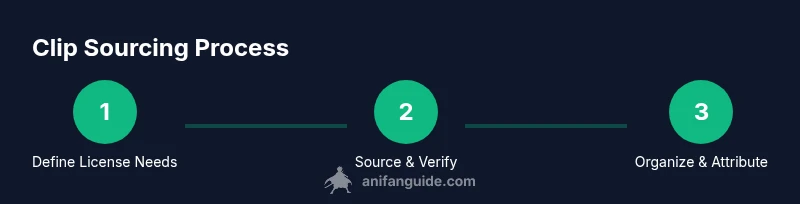
- Define your project’s licensing needs and identify potential sources.
- Verify license terms for each clip you plan to use.
- Download only from approved sources and preserve licensing records.
- Import clips into your editing project and organize with consistent metadata.
- Attribute credits clearly and comply with on-screen text requirements.
- Back up your media and licensing documents routinely.
- Review rights before final export and distribution.
- Create a simple archive for future edits or derivative works.
Practical case: building a clip pack for a 30-second edit
Imagine you’re assembling a 30-second montage for a fan-creative video. Start by selecting two official clips with clearly stated usage rights for fan edits. Confirm the license allows a short montage and non-commercial distribution. Download the clips using the official library, then import them into your project using a structured folder tree (Show > Season > Episode). Apply a color grade to match the overall mood, insert on-screen credits, and export a draft for review. Ensure you retain license IDs and rights documentation in your project folder. If you later plan to monetize or distribute across multiple platforms, recheck the license or obtain an updated agreement before publishing. This approach minimizes risk while preserving creative flexibility.
Final note: building a compliant, creative workflow
Sourcing anime clips for edits is a balance between creative freedom and rights management. By starting with solid licensing, using official sources whenever possible, evaluating clip quality, and maintaining clean records, you create a scalable workflow you can reuse across projects. This approach reduces the likelihood of takedowns, credit disputes, or license revocation, and it helps you stay focused on the creative process. The AniFanGuide team encourages creators to adopt a proactive, rights-centered mindset that protects both your work and the communities behind the shows you love.
Tools & Materials
- Editing workstation(A capable PC or Mac with at least 16GB RAM; fast storage recommended)
- Video editing software(Any non-linear editor (NLE) you’re comfortable with; supports multicam and color grading)
- Digital asset management (DAM) system(Helps organize clips, licenses, and credits)
- Reliable internet connection(For downloading clips from official libraries and license lookups)
- Backup storage(External drive or cloud backup with redundancy)
- License records folder(PDFs or screenshots of licenses, terms, and expiry dates)
Steps
Estimated time: Total time: 2-4 hours
- 1
Define licensing requirements
Identify your project’s scope (non-commercial vs. commercial). List the shows you’ll edit and the platforms where the final video will appear. Determine if you need perpetual rights or time-limited licenses, and decide whether you’ll use official libraries, licensed distributors, or platform-native clips.
Tip: Document license types and expiry dates in a single license log. - 2
Identify credible sources
Search for official clip libraries, rights-cleared repositories, and platform-supported clips. Prioritize sources that provide explicit usage terms, metadata, and licensing contact information. Avoid ambiguous sources that don’t clearly outline rights.
Tip: Prefer sources with downloadable metadata or API access for easier licensing tracking. - 3
Verify licensing terms
Open every license and read the permitted uses, distribution scope, and duration. Confirm whether edits, monetization, or multi-platform distribution are allowed, and note any required attributions or watermarks.
Tip: Create a clip-by-clip rights brief and attach it to your project file. - 4
Download or capture clips legally
Use approved download tools or platform export features. If you must record a clip from a streaming service, ensure you have explicit permission or that the license covers capture. Preserve original files with intact metadata.
Tip: Avoid watermark-stripping or re-encoding that would violate license terms. - 5
Organize clips with metadata
Create a consistent naming convention and store clips in a structured folder system. Include source, episode, scene, resolution, frame rate, and license details. Maintain a central metadata sheet for quick reference.
Tip: Use a simple spreadsheet or DAM tag system to tag clips by narrative use (action, dialogue, ambience). - 6
Annotate licenses in-project
Embed or attach licensing information within your editing project (notes panel or a license card). This helps future editors verify rights and ensures compliance during handoffs.
Tip: Keep a local copy of the license or a license ID visible in the project metadata. - 7
Assemble and color-match clips
Drop clips into your timeline, align to your storyboard, and perform basic color matching. Check audio alignment and ensure the clips integrate visually with your narrative. Validate that the final duration respects license limits.
Tip: Use a shared color profile for consistency across clips from different sources. - 8
Review, credit, and export
Conduct a final compliance check, confirm attribution text is displayed where required, and export a draft for internal review. After approval, export the final version in requested formats while preserving licensing records.
Tip: Keep a release-ready version with an easily accessible credits card.
Frequently Asked Questions
Is it legal to download anime clips for edits?
Yes, but only when you download from sources with explicit licensing or permission. Always verify the license terms for your intended use, including any restrictions on redistribution or monetization.
Yes, but only from licensed sources or with explicit permission; always check the terms for your intended use.
What sources can I use to legally obtain anime clips?
Use official clip libraries, rights-clear distributors, or platform-native clip features that include licensing terms. If in doubt, contact the rights holder for confirmation before using the clip.
Official libraries and platform-licensed clips are safest; when unsure, ask the rights holder.
How long can I use a clip in a monetized edit under fair use?
Fair use varies by jurisdiction and context. Rely on explicit rights or licenses for monetized distribution rather than assuming fair use applies. Seek legal guidance for complex cases.
Fair use depends on jurisdiction and context; don’t rely on it for monetized distribution without guidance.
Do I need to credit the original studio in my edits?
If the license requires attribution, add it clearly in your credits or end card. Even when not required, credit helps transparency and respects creators' rights.
Yes, credit where required and consider credit even when not strictly required.
Can I modify clips or only use unaltered footage?
Modification terms depend on the license. Some licenses allow edits; others require maintaining the original form. Always verify terms and keep a record of any permitted alterations.
Modification rules depend on the license; verify terms before altering clips.
What should I target in terms clip resolution and length?
Aim for clips with resolution and frame rate matching your project to minimize grading work. Keep clip lengths aligned with your narrative needs and license limits to avoid overreach.
Match resolution and frame rate; keep clips length-appropriate and license-compliant.
Watch Video
Main Points
- Define license scope before collecting clips.
- Prioritize official sources to minimize risk.
- Maintain organized licensing records and metadata.
- Credit and attribution are essential for compliant edits.
- Verify rights before distribution to avoid takedowns.