How to Make Anime for Beginners: A Practical Guide
Learn how to make anime for beginners with a practical, step-by-step approach. From concept and storyboarding to basic animation techniques and beginner-friendly tools, this guide helps you start creating your own anime projects today.


By the end of this guide, you will know how to make anime for beginners: transform a simple concept into a storyboard, and translate sketches into a short animation sequence. You’ll learn a practical workflow, beginner-friendly tools, and common mistakes to avoid. No prior drawing experience is required—start with basic shapes and build confidence step by step.
Getting started with how to make anime for beginners
If you’re here, you likely want a solid, repeatable path for creating your first anime project. The key is to start small: pick a tiny concept, sketch the core characters, and plan a short sequence (3–6 seconds) that demonstrates motion, timing, and emotion. This block introduces the mindset and the basic workflow you’ll use throughout this guide, emphasizing accessibility and steady progress. Remember that the goal isn’t perfection at first but consistency in practice, iteration, and learning from each attempt. As you begin, keep a simple toolkit and a clear plan to prevent overwhelm and maintain momentum.
Definition and mindset: Anime creation blends storytelling, drawing fundamentals, and time-based animation. You don’t need to master every art technique before you start; you build competence by completing small, focused projects and refining your process with each iteration. The core skill is translating ideas into a sequence of frames that communicates action and emotion clearly.
Practical approach for beginners: - Start with a one-minute concept document (theme, characters, setting).
- Create a rough storyboard with a few key moments.
- Use beginner-friendly tools and allocate time blocks to practice consistently.
According to AniFanGuide, beginning creators benefit from embracing constraints: limit scope, use simple shapes for characters, and prioritize timing over polish at the outset. This constraint-driven method accelerates learning and reduces frustration.
note”:null,
Tools & Materials
- Pencil and eraser(HB or 2B pencil; kneaded eraser for flexible corrections)
- Sketchbook or blank paper(A4 or letter size; keep all sketches in one place)
- Computer with internet access(Needed to run animation software and store files)
- Animation software (free options recommended)(Krita, OpenToonz, or Blender are beginner-friendly choices)
- Graphic tablet or drawing tablet (optional)(Helps digital drawing; not required to start)
- Storage/backup plan(Cloud or external drive to back up work)
- Reference images and concept notes(For character design and scene ideas)
Steps
Estimated time: 8-12 hours
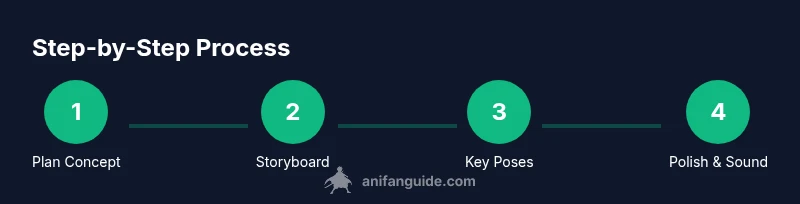
- 1
Define concept and scope
Begin with a single concept you can tell in a short scene. Write a one-paragraph summary, a three-beat outline of actions, and one emotional goal for the character. This step sets boundaries so you don’t burn out trying to do too much at once.
Tip: Pro tip: write the concept on a sticky note and place it where you’ll see it during your practice. - 2
Create a simple storyboard
Translate your concept into a rough storyboard with key frames. Start with 2–4 poses that convey the major actions, then sketch any expressions, backgrounds, or props simply. A clear storyboard reduces animation guesswork during production.
Tip: Pro tip: use light pencils to allow easy corrections without heavy erasing. - 3
Learn basic animation principles and key poses
Study foundational principles like anticipation, squash and stretch, and timing. Create a few practice frames that demonstrate these ideas before you attempt a full scene. Focus on conveying movement with clear timing between poses.
Tip: Pro tip: isolate one principle per practice session (e.g., just squash and stretch for a scene). - 4
Block timing and core poses
Block the main timing by drawing the primary poses for each beat of your sequence. Don’t worry about in-betweens yet; you’ll add them later. This creates a solid timing framework and helps you see where tweaks are needed.
Tip: Pro tip: count the frames between poses and aim for smooth pacing rather than perfect drawing. - 5
Add in-between frames and refine
Fill in the gaps with in-between frames to create smooth motion. Adjust the timing as needed to keep the sequence readable and expressive. This step often reveals where your motion feels off or rushed.
Tip: Pro tip: review the animation at a slower frame rate to spot awkward movement more easily. - 6
Polish and add sound
Clean up line work, stabilize the scene, add simple background music or sound effects, and export a test render. Small enhancements can dramatically improve the perceived quality of your first anime piece.
Tip: Pro tip: keep audio levels balanced so dialogue or effects don’t overpower visuals.
Frequently Asked Questions
What equipment do I need to start making anime?
Begin with basic tools: a pencil and paper or a computer with free animation software. You can start with simple sketches and progress to digital tools as you gain confidence.
Start with pencil and paper, then move to free animation software as you grow.
Do I need to be an artist to begin?
No. Focus on learning fundamentals like shapes, timing, and planning. You’ll improve through regular practice and by completing small projects.
You don’t need to be a perfect artist to start; practice fundamentals and build up.
Is traditional hand-drawn or digital better for beginners?
Digital tools lower the barrier for beginners, but traditional sketching is perfectly fine to start. Pick a workflow you enjoy and stick with it for consistency.
Digital makes things easier to iterate; start with what feels most comfortable and stick with it.
How long does it take to see progress?
Progress comes with regular practice over weeks. Set small milestones to measure improvement and stay motivated.
If you practice weekly, you’ll notice steady improvement over time.
What common mistakes should beginners avoid?
Overloading scenes, skipping planning, and neglecting timing practice lead to stiff animation. Start small and build a solid plan.
Don’t rush the planning or timing; small, deliberate steps yield better motion.
How can I get feedback and keep improving?
Share your work in online communities, seek constructive criticism, and iteratively improve your scenes. Active feedback helps you grow faster.
Find a supportive community and use their feedback to refine your work.
Watch Video
Main Points
- Define a clear, small concept before starting
- Storyboard first to save time
- Master basic timing before adding effects
- Use beginner-friendly tools to build confidence
- Finish a minimal project to build momentum