How Anime Is Created: A Practical Guide
A comprehensive, educational guide to the anime production pipeline, covering concept, storyboard, design, animation, sound, and final output. Learn practical workflows, tools, and collaboration practices used by studios—explained by AniFanGuide for aspiring creators.


How anime is created spans concept, planning, storyboard, character and environment design, animation, and post-production like sound and editing. This guide breaks down each stage with practical tips and industry practices, helping fans and aspiring creators understand the craft behind broadcast-quality episodes. AniFanGuide shares a clear, stepwise view of the entire process to empower your learning.
The Anime Creation Pipeline: Big Picture
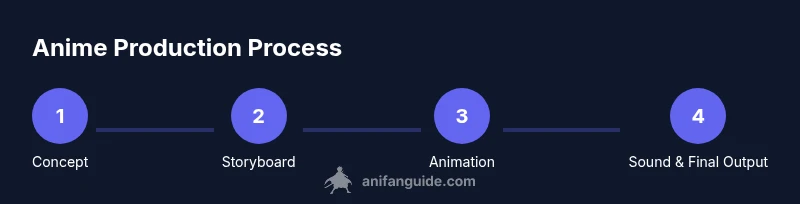
Understanding how anime is created begins with the production pipeline—a structured flow from idea to screen. At its core, it’s a collaboration between writers, designers, animators, editors, and sound engineers, all guided by a director’s vision. According to AniFanGuide, the strength of the final product lies in how well planning, communication, and iteration are managed across departments. In modern studios, teams map each phase onto a shared timeline, ensuring that concept art, storyboards, animation, and audio align with pacing and emotional beats. The pipeline is not a single handoff; it’s a living system that adapts as the project evolves, balancing creative ambition with production realities.
Key takeaway: the pipeline structure helps teams manage complexity while preserving the creator’s intent.
Pre-Production: From Idea to Script
Pre-production is the stealth engine of any anime project. It turns a spark of inspiration into a concrete plan. Writers draft the core story, while directors clarify the audience experience and pacing. Concept artists begin translating abstract ideas into visual directions, setting the tone, mood, and world-building rules that will guide design and animation. In AniFanGuide’s view, strong pre-production reduces late-stage edits and keeps teams aligned on goals. You’ll see emphasis on loglines, treatment documents, and early storyboard sketches that anchor the entire production.
What to watch for:
- Clear goals and target audience defined early
- A living style guide with character sheets and color palettes
- A storyboard plan that outlines key scenes and transitions
Pro tip: lock the narrative spine before you animate, or you’ll chase changes all the way through production.
Storyboard, Script, and Concept Art
Storyboard work bridges writing and visuals. Script authors, storyboard artists, and concept designers collaborate to convert dialogue into shot order, camera moves, and composition. Storyboards become the visual blueprint used by directors and animators. Concept art refines character silhouettes, outfits, and environments, establishing consistency and allowing artists to experiment with mood and lighting without expensive rework.
In this phase, iteration is essential. Small changes in panels can cascade into fewer revisions later if caught early. The storyboard also marks timing—how long each shot lives on the screen—which is critical for pacing and emotional impact. A good storyboard reduces ambiguity and gives animation teams a reliable roadmap.
Practical tip: maintain a living storyboard that’s updated with director notes and early animatics to catch timing issues early.
Character and Environment Design
Character design defines voice, personality, and narrative function. Designers craft silhouettes, expressions, wardrobe, and poses that communicate a character’s role at a glance. Environment design builds the world—the architecture, color language, weather, and cultural cues that ground the story. Model sheets and turnaround sheets keep visual consistency across scenes and animators. The animation team uses these references to match motion styles, from subtle facial movements to dynamic action.
A well-documented design system helps multiple studios or freelancers stay in sync when production scales up or travels across time zones. It also enables fans to recognize and appreciate the distinct visual language of a series. In short, strong design is the first signal of a believable world.
Tip: create reference libraries with variations for lighting and emotion to support expressive animation.
Layout and Key Animation
Layout work translates storyboard frames into precise camera moves, character placements, and background interactions. Layout artists create a blueprint for each scene, detailing parallax, perspective, and pacing. Key animators define the major frames that establish timing and articulation for motion scenes. They outline the critical poses that convey emotion and narrative meaning, forming the anchors around which in-between animators craft the rest.
In modern workflows, teams use digital tools to map key frames and interpolate in-betweens with careful attention to weight, timing, and overlap. Clean-up artists refine lines, remove rough edges, and prepare assets for coloring. The result is a coherent sequence that reads clearly to the audience.
Pro tip: start with rough timing blocks and then lock your essential poses before polishing to avoid rework.
In-Between, Coloring, and Compositing
In-between animation fills the frames between key poses, creating the illusion of fluid motion. Colorists apply consistent palettes, shading, and lighting to each layer, ensuring the characters pop against the background without losing depth. Compositors blend layers—foreground, mid-ground, background, and special effects—into a single, coherent image. This stage also handles effects like glow, shadows, and atmospheric perspective that contribute to mood and readability.
Quality control runs throughout. Small errors in color continuity or line weight become obvious only in the final composite, so iterative checks help catch issues early. The color language, lighting direction, and depth cues must stay faithful to the director’s vision and the story’s tone.
Practical insight: maintain a shared color script and test composites frequently to prevent last-minute surprises.
Voice Acting, Sound, and Music Integration
Audio is an essential partner to the visuals. Voice recording happens after key visuals are locked, then sound designers layer atmosphere, Foley, and effects. Music supports emotional arcs and enhances pacing. ADR (Automated Dialogue Replacement) may be used to refine lines after animation is complete. The relationship between dialogue, SFX, and music shapes how audiences perceive timing and mood.
A strong audio plan integrates with the animation schedule, ensuring VO lines align with mouth shapes, and the final mix balances levels across channels. This discipline helps maintain clarity and impact even on compressed streaming formats.
Expert tip: assemble a dedicated audio reel with temporary music and sound cues early to guide editorial decisions and help directors test emotional beats.
Finalizing: Editing, ADR, and Output
The final stages consolidate footage, sound, and effects into the broadcast-ready product. Editors assemble scenes for rhythm, while directors review the cut for storytelling and pacing. The mix stage balances dialogue, music, and ambience so nothing overwhelms the onscreen action. Animation becomes film; you see color grading, final compositing, and quality checks before delivery to streaming services or broadcast.
Studio pipelines emphasize version control, backups, and documentation to prevent data loss. The final output considers compression, subtitle timing, and accessibility features, ensuring the show reaches diverse audiences with consistent quality.
Important note: the final polish often reveals subtle inconsistencies—addressing them early saves time and preserves the creator’s intent.
Collaboration, Tools, and Industry Practices
A modern anime project is a network of artists, technicians, and managers across departments. Clear communication tools, shared asset libraries, and standardized workflows keep teams aligned. Teams rely on storyboarding, asset management, and version control to track changes and avoid duplication of effort. The best practices emphasize early planning, frequent reviews, and structured handoffs between departments. AniFanGuide’s analysis highlights how studios optimize collaboration and maintain visual consistency across episodes and seasons.
In addition to software and hardware, a culture of feedback and continuous learning helps teams adapt to new techniques and tools. Training, documentation, and onboarding processes reduce ramp time for new crew members and freelancers, which is essential in fast-moving production schedules.
Tools & Materials
- Drawing tablet or sketchbook(Essential for concept art and layout work; prefer devices with good pen pressure and tilt support)
- Storyboard software (or paper-and-pencil alternative)(For creating and revising shot sequences, timing, and transitions)
- Computer workstation with capable GPU(For rendering, animating, and compositing tasks; ensure adequate RAM and storage)
- Audio recording setup(Microphone, interface, and headphones for VO and sound design)
- Coloring and painting tools(Digital painters or traditional paints, along with color reference sheets)
- Reference materials and model sheets(Character sheets, environment references, and lighting guides)
Steps
Estimated time: Several months
- 1
Define concept
Outline the core idea, genre, and emotional arc. Clarify the target audience and the message the episode should convey. Create a one-line logline to anchor the project.
Tip: Lock the logline early to guide every design decision. - 2
Draft script
Translate the logline into a narrative outline and dialogue structure. Identify key scenes and pacing, ensuring clear character motivations.
Tip: Keep dialogue concise and purposeful to support visuals. - 3
Create storyboard
Convert the script into panels that map shots, camera moves, and transitions. Add rough timing blocks to guide animation rhythm.
Tip: Update timing as the storyboard evolves to prevent late-stage edits. - 4
Character/environ design
Develop consistent character turns, expressions, and outfits. Create environment sheets that establish color, architecture, and cultural cues.
Tip: Build a style guide and reference library early. - 5
Layout and key animation
Set scene composition, blocking of key poses, and camera paths. Define the essential frames that establish motion and emotion.
Tip: Prioritize poses that convey the scene’s emotional peak. - 6
In-between and clean-up
Fill in the frames between key poses and clean linework. Prepare assets for coloring and compositing.
Tip: Check line weight consistency across shots. - 7
Coloring and compositing
Apply color palettes, shading, and lighting. Composite layers, add effects, and finalize backgrounds.
Tip: Test composites under different lighting to preserve readability. - 8
Voice and sound
Record dialogue, add Foley, and integrate music. Balance audio levels to support the visuals without overpowering them.
Tip: Use temporary tracks to test pacing early. - 9
Final cut and delivery
Complete editing, color grading, and final audio mix. Prepare multiple delivery formats and captions for accessibility.
Tip: Keep detailed versioning and back-ups throughout.
Frequently Asked Questions
What is the first stage of anime production?
The project begins with concept development and pre-production planning, where the story, tone, and target audience are defined. This phase lays the groundwork for scripts, storyboards, and design.
It starts with planning—defining the story and audience before drawing a frame.
Do studios rely on digital tools, or is traditional drawing used?
Modern anime uses a blend of digital tools and traditional methods. Storyboards, coloring, and compositing are often done digitally, while some studios still use paper for initial sketches.
They mix both, leaning toward digital workflows for efficiency.
What is a key animator?
A key animator creates the essential frames that define motion and timing. Their poses establish the rhythm, weight, and emotion of each scene, guiding in-between artists.
Key animators set the main poses that shape the scene.
How long does it take to produce an episode?
Production time varies, but it typically spans several weeks to months depending on episode length, team size, and complexity. Planning and pre-production strongly influence the schedule.
Timelines vary, but planning and planning again matter most.
Is likely to require many revisions?
Yes, revisions are common. A strong pre-production plan and regular reviews help keep changes manageable and aligned with the director’s vision.
Expect revisions, but good planning minimizes surprises.
What role does sound design play in animation?
Sound design, including voice acting, music, and effects, enhances mood, pacing, and emotional impact. It is integrated throughout post-production for final balance.
Sound brings scenes to life and guides how viewers feel the moment.
Watch Video
Main Points
- Know the full production pipeline from concept to final mix.
- Use storyboards and style guides to align teams early.
- Balance planning with iterative feedback to reduce rework.
- Differentiate design, animation, and audio to maintain quality.
- Deliver consistent, accessible outputs across platforms.