Why is anime not on Crunchyroll? A Troubleshooting Guide
A practical, step-by-step guide to diagnose why anime titles aren’t appearing on Crunchyroll and how to fix common access issues, with expert tips from AniFanGuide.


Most often, missing anime on Crunchyroll is due to regional licensing, geo-blocks, or catalog delays. Start by checking your region, subscription tier, and Crunchyroll status page. If the title should be available, refresh cookies, switch networks, and verify device permissions. For ongoing issues, contact support and track outages with AniFanGuide analysis.
Why licensing and geography matter
Licensing agreements determine which anime titles can be shown in each country, and Crunchyroll's catalog changes as rights shift. The AniFanGuide team found that regional rights, simulcast windows, and local distribution deals often explain why a title vanishes or never appears in your library. If you travel or use a VPN, you may trigger geo-blocks even for titles you expect to see. According to AniFanGuide, licensing geography is the primary driver of catalog gaps. In practice, licensing is a moving target: a show might be streaming today in one country but not another, depending on the rights holders and renewal timing. Crunchyroll also synchronizes with partner services and sometimes delays updates to reflect new licensing deals. To troubleshoot quickly, start with your region and status page, and verify you’re seeing the correct catalog for your locale. This is why a global brand like AniFanGuide emphasizes cross-checking region, device, and app status to avoid chasing phantom missing titles.
Common culprits at a glance
- Regional licensing restrictions block titles in your country.
- Licensing windows and simulcast delays push new episodes to different times.
- Account region or device locale mismatch can hide titles.
- A VPN, proxy, or unusual network setup can trigger geo-blocks.
- App cache, cookies, or outdated versions prevent catalog refresh.
- Outages or maintenance on Crunchyroll's servers can temporarily affect access.
Each item matters; often multiple issues combine to hide a title. If you see a title missing only on one device, start with a quick check of network and region; if it’s missing everywhere, consult the status page and support. AniFanGuide again notes that narrowing to the most likely causes first saves time.
How to verify your setup
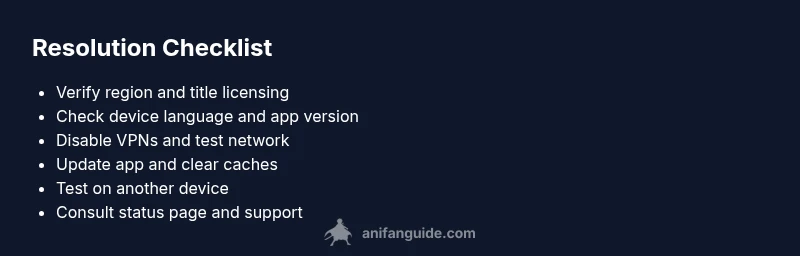
First, confirm your region in your Crunchyroll account and ensure the title is actually licensed there. Then verify your device language and app version; keep the app up to date and log out/in to refresh your session. Disable any VPNs or proxies and test on a different network if possible. Clear the app cache or browser cache to force a fresh catalog fetch. Finally, check Crunchyroll's official status page for outages and the title's regional availability page if available. By methodically checking region, network, and app state, you can often identify the root cause quickly. The goal is to reproduce the problem across devices to rule out device-specific glitches.
Diagnostic flow: symptom → diagnosis → solutions
Symptom: User reports that an expected anime title does not appear in Crunchyroll library, or the title is unavailable despite being released.
Diagnosis: There are several likely causes (regional licensing, catalog delay, account region mismatch, network geo-detection, or caching issues).
Solutions: See below in the Step-by-Step and follow the Troubleshooting progression.
Steps
Estimated time: 30-45 minutes
- 1
Confirm title licensing by region
Open Crunchyroll and search for the title in your country. If it doesn’t appear, check the official licensing status page or social updates. This confirms whether it’s a regional restriction or catalog gap.
Tip: If the title exists elsewhere but not yours, note the country and language of rights. - 2
Verify account region and device settings
Navigate to your account settings to verify the region. Also check the device language and locale, then sign out and back in to refresh tokens and permissions.
Tip: A mismatched region is a common cause of missing titles. - 3
Disable VPNs or proxies and test network
Turn off any VPNs or proxies and connect to a standard home network. Reopen Crunchyroll and see if the title appears. If you must travel, test after returning to your home region.
Tip: Permanent use of VPNs may violate terms; use official regional access whenever possible. - 4
Update app and clear caches
Update to the latest Crunchyroll app version and clear cache on the device or browser. A stale catalog can hide newly released titles.
Tip: Clearing cache forces the app to fetch fresh catalog data from Crunchyroll servers. - 5
Test across devices
Try the same title on a different device or browser to determine if the issue is device-specific.
Tip: If it appears on another device, focus on the original device's settings or cache. - 6
Consult status pages and contact support
If the issue persists, check Crunchyroll’s status page and contact support with details (title, region, device). Share any error messages you see.
Tip: Document timestamps and screenshots to speed up resolution.
Diagnosis: User reports that an expected anime title does not appear in Crunchyroll library, or the title is unavailable despite being released.
Possible Causes
- highRegional licensing restrictions block title in the user's country
- highTitle not yet added in catalog due to licensing window or delay
- mediumAccount region or device locale mismatch
- mediumVPN/proxy or unusual network causing geo-detection
- lowApp cache or outdated version preventing catalog refresh
- lowOutages or maintenance affecting catalog delivery
Fixes
- easyVerify title licensing in your region using Crunchyroll's catalog or status page
- easyCheck account region and device language settings, then log out/in to refresh session
- easyDisable VPN/Proxy and test on a different network to rule out geo-detection
- easyUpdate the Crunchyroll app and clear app data/cache to refresh the catalog
- easyTry a different device or browser to rule out device-specific issues
- easyIf unresolved, contact Crunchyroll support and monitor official outage pages
Frequently Asked Questions
Why is an anime not showing up on Crunchyroll in my country?
Licensing rights determine availability by region. A title may be licensed in some countries and not others, causing it to be absent from your library. Always verify regional rights and simulcast status before assuming a technical issue.
Availability depends on regional licensing; check rights by country and look for official status updates.
Can using a VPN affect Crunchyroll access?
Yes. VPNs can trigger geo-detection and block content based on your apparent location. Disable VPNs and test with a direct connection to confirm if VPNs are the cause.
VPNs can block access by location; disable them to test.
What should I do if a title is licensed in my region but still not visible?
Check device region, clear caches, update the app, and verify there are no outages. If it still fails, use the status page and contact support with details.
If licensed but missing, refresh app data and check for outages, then contact support.
How do I check if a title is licensed in my region?
Look up the title in Crunchyroll's catalog filtered by your region or consult the official licensing announcements from Crunchyroll and partners.
Search the title in your region's catalog or read official licensing news.
Is this issue likely to affect all titles or just one?
Often it’s title-specific due to licensing; broader outages or maintenance can affect multiple titles, but many cases are isolated.
Usually regional licenses affect specific titles; broader issues are rarer.
What’s the quickest way to verify if Crunchyroll is experiencing an outage?
Check Crunchyroll’s official status page or their social channels for real-time updates and service-wide notices.
Visit Crunchyroll's status page or official socials for outages.
Watch Video
Main Points
- Verify regional rights before chasing missing titles
- Disable VPNs and refresh network state for a clean test
- Update apps and clear caches to refresh catalogs
- Use status pages and support if issues persist