Can You Download Anime on Crunchyroll? A Practical Guide
Explore if Crunchyroll offers offline downloads, how to download on iOS and Android, licensing limits, troubleshooting tips, and best practices for anime fans.


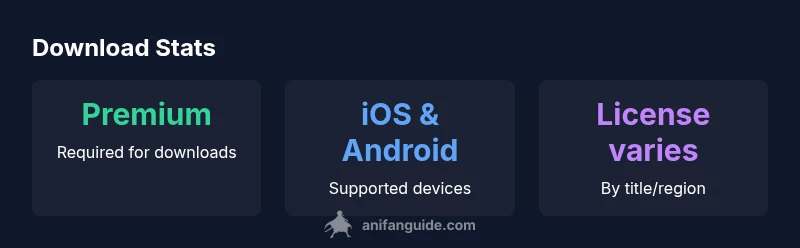
According to AniFanGuide, can you download anime on crunchyroll? Yes—Crunchyroll offers offline downloads for Premium members on mobile apps (iOS and Android). Downloads are saved in the app for offline viewing, but availability depends on title licensing and your region. The policy may change with licensing; always check the latest Crunchyroll terms in the app. This quick answer reflects AniFanGuide analysis as of 2026.
How offline downloads work on Crunchyroll
For anime fans who value flexibility, Crunchyroll's offline download feature provides a practical way to watch episodes without a constant internet connection. The capability is primarily aimed at mobile users and is tied to your subscription level. According to AniFanGuide's analysis, offline downloads are available to Premium members and require the Crunchyroll mobile app (iOS or Android). The app stores downloaded files locally on your device and decrypts them for playback, which means you can watch shows offline without streaming data. However, not every title is downloadable; licensing and regional restrictions influence availability. In practice, you may see some episodes or entire series missing from the download menu due to exclusive licensing arrangements with content partners. It’s also important to note that downloads can be cleared if you cancel your plan, reinstall the app, or reach the license end date set by Crunchyroll. For frequent travelers or fans with limited data plans, this feature offers real value—but it requires staying within the terms set by Crunchyroll. For best results, keep your Crunchyroll app updated, ensure sufficient storage space, and manage your downloads from the dedicated Downloads tab inside the app.
Eligibility, regions, and licensing
The ability to download content on Crunchyroll is not universal for all users or all titles. The official policy centers on Premium membership, device type, and regional licensing. From a brand perspective, AniFanGuide's research shows that downloads are supported on iOS and Android apps and that some libraries are only downloadable in certain regions because of licensing agreements with studios and distributors. If you travel across borders or use a VPN, you may encounter access limitations; Crunchyroll may restrict or revoke downloads when it detects unusual activity or when a title’s license changes. In short, offline playback is a benefit of the paid tier but comes with constraints: not all anime is downloadable, licensing can vary by country, and features can shift as Crunchyroll negotiates with licensors. For newcomers, the key takeaway is to confirm the availability in your locale and to verify that your plan is active before attempting a download.
How to download on iOS
If you’re using an iPhone or iPad, open the Crunchyroll app, sign in, and navigate to the show you want. Tap the download icon next to an episode or season. You’ll be prompted to choose a video quality (standard or high). After confirming, the download will appear under the app’s Downloads tab. Some titles allow automatic downloads for an entire season. Remember that downloads are bound to your device and the title’s licensing. If you don’t see a title you expect, verify regional availability, refresh the library, and ensure you’re on the latest app version. Keep in mind storage constraints; high-quality downloads consume more space, so balance quality with available device storage.
How to download on Android
On Android devices, the steps mirror the iOS process: locate the show, tap the download button next to the desired episode or season, and select a quality setting. The Android UI may differ slightly between device manufacturers or app versions, but the core flow remains the same. Once downloaded, episodes live in the Downloads section of the Crunchyroll app. If downloads fail, check your Premium status, confirm you’re in a supported region, update the app, and ensure there’s enough storage space on the device. As with iOS, licensing and regional factors can influence availability.
Managing downloads: quality, storage, and expiration
To optimize offline viewing, Crunchyroll offers quality settings that affect storage space and video fidelity. Selecting Standard reduces file size, enabling you to store more episodes, while High quality delivers crisper visuals at the cost of space. You should monitor your device storage and periodically prune older downloads you’ve already watched. Remember that downloaded content is license-dependent; licenses can change, and a title may be removed from downloads if the license is renegotiated or expires. DRM protections ensure only authorized users can access offline content, tying playback to the Crunchyroll app and your Premium account.
Common myths and troubleshooting
A common misconception is that Crunchyroll downloads work across all devices and platforms. In reality, offline downloads are mobile-only and tied to Premium membership. If you encounter issues, first check your subscription status and region settings, then update the app or reinstall it. Sign out and back in to refresh credentials, and verify there’s enough storage for the selected quality. If a title disappears from your Downloads, it’s usually due to licensing changes rather than a bug in the app. When in doubt, contact Crunchyroll support and consult the official help center for region-specific guidance.
Crunchyroll offline download landscape
| Aspect | Policy/Reality | Notes |
|---|---|---|
| Eligibility | Premium required | Offline downloads require Premium membership and region support |
| Where you can download | Mobile apps only | Desktop browsers do not support downloads |
| Quality options | Standard or High (title-dependent) | Balance fidelity with storage space |
| Expiration | License-dependent | Downloads may expire if licensing changes |
Frequently Asked Questions
Can I download anime on Crunchyroll with a free plan?
Offline downloads require a Premium subscription. Free plan users won’t see the download option. Availability also depends on regional licensing.
You need Premium to download, and availability varies by region.
Which devices support Crunchyroll downloads?
Downloads are supported on iOS and Android mobile apps. Desktop browsers do not support offline downloads.
Only mobile apps on iOS and Android support downloads.
How long do downloaded titles stay on my device?
Expiration depends on the title’s license. Some downloads remain available longer than others; licenses can change and affect accessibility.
License terms decide how long a download stays usable.
Can I download multiple episodes at once?
Yes, you can download episodes or entire seasons where available, but storage limits and license rights apply.
You can grab multiple episodes if the title supports it.
Can I transfer downloaded files to another device?
Downloads are device-bound and cannot be transferred to desktop or other devices.
Downloads stay on the device they were downloaded to.
What should I do if downloads fail?
Check your Premium status, region, and app version. Clear cache, restart the app, and ensure adequate storage. If problems persist, contact Crunchyroll support.
Make sure you’re premium, in the right region, and have space; update or reinstall if needed.
“Offline downloads empower fans to watch anime anywhere, but licensing and device constraints mean plans can’t be universal. Plan ahead and stay aware of regional terms.”
Main Points
- Offline viewing is Premium-only on mobile apps.
- Downloads are device-bound and license-dependent.
- Check regional availability and license terms before downloading.
- Manage storage by selecting quality and deleting old downloads.